
如前所述,监视器会定期发出运行状况检查,以评估池中每台服务器的运行状况。
    flowchart RL
      accTitle: 负载均衡监控流程
      accDescr: 监控器发出健康检查请求,以验证每个池内服务器的当前状态。
      Monitor[监控器] -- 健康检查 ----> Endpoint2
      Endpoint2 -- 响应 ----> Monitor
      subgraph Pool [池]
      Endpoint1((端点 1))
      Endpoint2((端点 2))
      end
Requests issued by a monitor at regular interval and — depending on the monitor settings — return a pass or fail value to make sure an endpoint is still able to receive traffic.
Each health monitor request is trying to answer two questions:
- Is the endpoint offline?: Does the endpoint respond to the health monitor request at all? If so, does it respond quickly enough (as specified in the monitor's Timeout field)?
- Is the endpoint working as expected?: Does the endpoint respond with the expected HTTP response codes? Does it include specific information in the response body?
If the answer to either of these questions is "No", then the endpoint fails the health monitor request.
根据服务器池的特征,您可以有多个自定义选项,这些选项会影响如何以及是否将服务器视为运行状况不佳。
Health Threshold 是 pool 整体被视为健康并根据负载均衡器中的 pool 顺序接收流量所需的健康 endpoint 数量。增加此数值会使 pool 更可靠,但也更容易变为不健康。
对于 pool 的 Health Monitor Regions(健康监视器区域) 中选择的每个选项,Cloudflare 会从该 region 内的三个独立数据中心发送健康 monitor 请求。
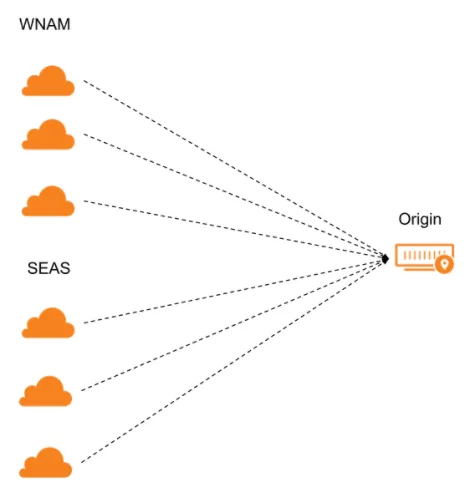
如果该 region 的大多数数据中心通过健康 monitor 请求,则该 region 被视为健康。如果大多数 region 健康,则 endpoint 本身将被视为健康。
All Data Centers(仅 Enterprise)
健康 monitor 探测从 Cloudflare 网络中的每个数据中心发送到关联 pool 内的 endpoint。这允许探测在客户设置的间隔内命中每个 endpoint。
All Regions(仅 Enterprise)
每个 region 向关联 pool 中的每个 endpoint 发送三个健康 monitor 探测。共有 13 个 region,总计 39 个探测。
Regional
从 pool 配置中指定的每个 region 发送三个健康 monitor 探测。
在您创建监视器时,您可以根据附加池的特征调整一些配置设置:
基本设置
- Type(类型):健康 monitor 使用的协议
- 非 Enterprise 客户:选择 HTTP、HTTPS 或 TCP。
- Enterprise 客户:选择 HTTP、HTTPS、TCP、UDP ICMP、ICMP Ping 或 SMTP。
- Path(路径):运行健康 monitor 请求的 endpoint 路径
- Port(端口):健康 monitor 的目标端口
高级设置
- Interval(时间间隔):
- 增加默认值可以缩短故障转移时间,但也可能增加 endpoint 负载。
- 最短间隔(秒)为 60(Pro)、15(Business)和 10(Enterprise)。
- Timeout(超时) 和 Retries(重试):
- 如果健康 monitor 请求超过 Timeout(超时) 指定的时长(且超过 Retries(重试) 指定的次数),将返回不健康。
- Expected Code(s)(预期状态码):预期的 HTTP 响应码,可单独列出(
200、302)或作为范围(例如,输入2xx将涵盖200范围内的所有响应码)。 - Response Body(响应正文):
- 在响应正文中查找不区分大小写的子字符串。
- 确保该值相对静态,且位于 HTML 页面前 10 KB 内。
- Simulate Zone(模拟区域):
- 建议使用负载均衡器所在的同一 zone。
- 更改健康 monitor 请求的出站 zone 设置,以确保与 Authenticated Origin Pulls (mTLS)、Argo Smart Routing、Bring your own CA (mTLS)、Dedicated CDN Egress IPs 和 HTTP/2 to Origin 等功能兼容。
- Follow Redirects(跟随重定向):
- 健康 monitor 请求会跟随重定向到最终 endpoint,而不是将
301或302码报告为不健康。
- 健康 monitor 请求会跟随重定向到最终 endpoint,而不是将
- Configure Request Header(s)(配置请求标头):
- 如果您的 endpoint 期望特定的传入标头,此选项很有用。
- Header(标头):
- 健康 monitor 中发送的 HTTP 请求标头。建议默认设置 Host 标头。User-Agent 标头无法覆盖。此参数仅对 HTTP 和 HTTPS monitor 有效。
您还需要决定负载均衡器中哪些关联池应作为回退池。
此 pool 旨在作为最后手段 pool,意味着在定向流量时不考虑其健康状态。
Fallback pool 很重要,因为即使所有 pool 都不可达(已禁用或不健康),流量仍可能到达负载均衡器。负载均衡器需要将这些流量路由到某处,因此会将其发送到 fallback pool。