
@cloudflare/playwright-mcp ↗ 是 Playwright MCP ↗ 服务器的一个 fork,使用 Playwright 和 Browser Run 提供浏览器自动化能力。
此服务器使 LLM 能够通过结构化的无障碍快照与网页交互,无需屏幕截图或视觉调优模型。其主要特性包括:
- 快速轻量。使用 Playwright 的无障碍树,而非基于像素的输入。
- 对 LLM 友好。无需视觉模型,完全基于结构化数据运行。
- 确定性工具应用。避免基于屏幕截图的方法常见的歧义。
如果你已熟悉 Cloudflare Workers 并想立即开始使用 Playwright MCP,请选择此按钮:
这会在你的 GitHub 账户中创建仓库并将应用部署到 Cloudflare Workers。如果你熟悉 Cloudflare Workers 并希望跳过逐步指南,请使用此选项。
有关如何构建和部署 Playwright MCP 的更多信息,请查看我们的 GitHub 页面 ↗。
按照以下步骤部署 @cloudflare/playwright-mcp:
- 安装 Playwright MCP npm 包 ↗。
npm i -D @cloudflare/playwright-mcpyarn add -D @cloudflare/playwright-mcppnpm add -D @cloudflare/playwright-mcpbun add -d @cloudflare/playwright-mcp- 确保 Wrangler 配置文件中包含 Browser Run 和 Durable Object 绑定以及 migrations(迁移)。
{
	"$schema": "./node_modules/wrangler/config-schema.json",
	"name": "playwright-mcp-example",
	"main": "src/index.ts",
	// Set this to today's date
	"compatibility_date": "2026-08-17",
	"compatibility_flags": ["nodejs_compat"],
	"browser": {
		"binding": "BROWSER",
	},
	"migrations": [
		{
			"tag": "v1",
			"new_sqlite_classes": ["PlaywrightMCP"],
		},
	],
	"durable_objects": {
		"bindings": [
			{
				"name": "MCP_OBJECT",
				"class_name": "PlaywrightMCP",
			},
		],
	},
}
"$schema" = "./node_modules/wrangler/config-schema.json"
name = "playwright-mcp-example"
main = "src/index.ts"
# Set this to today's date
compatibility_date = "2026-08-17"
compatibility_flags = [ "nodejs_compat" ]
[browser]
binding = "BROWSER"
[[migrations]]
tag = "v1"
new_sqlite_classes = [ "PlaywrightMCP" ]
[[durable_objects.bindings]]
name = "MCP_OBJECT"
class_name = "PlaywrightMCP"- 编辑代码。
import { env } from "cloudflare:workers";
import { createMcpAgent } from "@cloudflare/playwright-mcp";

export const PlaywrightMCP = createMcpAgent(env.BROWSER);

export default {
	fetch(request: Request, env: Env, ctx: ExecutionContext) {
		const { pathname } = new URL(request.url);

		switch (pathname) {
			case "/sse":
			case "/sse/message":
				return PlaywrightMCP.serveSSE("/sse").fetch(request, env, ctx);
			case "/mcp":
				return PlaywrightMCP.serve("/mcp").fetch(request, env, ctx);
			default:
				return new Response("Not Found", { status: 404 });
		}
	},
};- 部署服务器。
npx wrangler deploy服务器现已在 https://[my-mcp-url].workers.dev/sse 可用,你可以将其与任何 MCP 客户端配合使用。
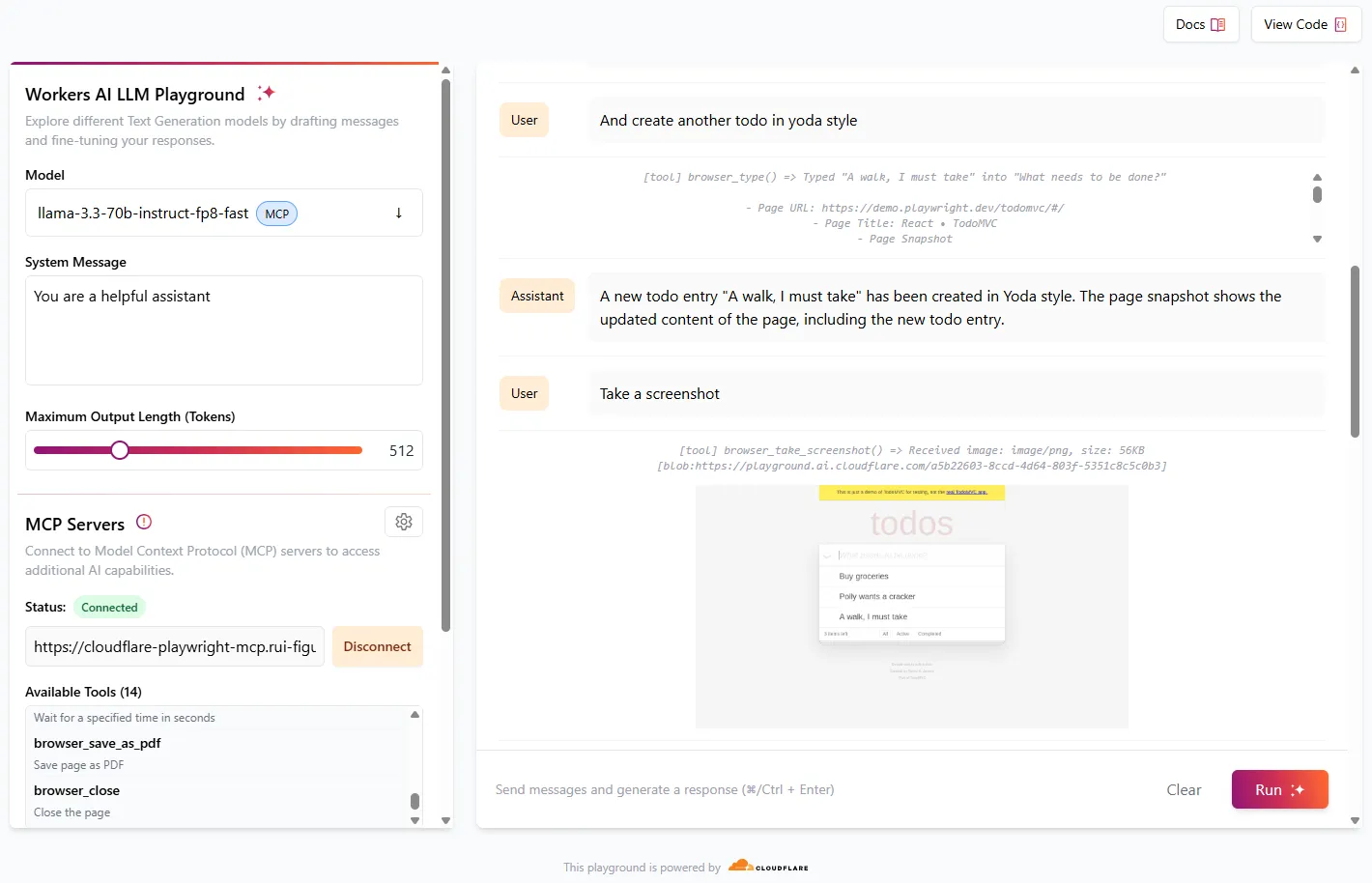
Cloudflare AI Playground ↗ 是使用 Workers AI 中可用的 LLM 模型测试 MCP 服务器的绝佳方式。
- 前往 https://playground.ai.cloudflare.com/。 ↗
- 确保模型设置为
llama-3.3-70b-instruct-fp8-fast。 - 在 **MCP Servers(MCP 服务器)**中,将 URL 设置为
https://[my-mcp-url].workers.dev/sse。 - 点击 Connect(连接)。
- 状态应更新为 Connected(已连接),并列出 23 个可用工具。
你现在可以开始与模型交互,它将运行必要的工具来完成所请求的任务。
尝试以下指令序列以查看 Playwright MCP 的实际效果:
- "前往 demo.playwright.dev/todomvc"
- "创建一些待办事项"
- "很好。现在用鹦鹉的风格创建一条待办事项"
- "再用尤达的风格创建一条待办事项"
- "截取屏幕截图"
你也可以使用其他 MCP 客户端,如 Claude Desktop ↗。
有关更多示例和 MCP 客户端配置选项,请查看我们的 GitHub 页面 ↗,并参阅开发者文档了解如何在 Cloudflare 上构建 Agents。