
Stagehand ↗ 是一个开源的 AI 驱动浏览器自动化库。Stagehand 让你将代码与 AI 驱动的自然语言指令相结合,无需指定确切步骤或选择器。借助 Stagehand,你的智能体对网站变更更具弹性且更易于维护,帮助你更可靠、更灵活地构建。
本指南展示如何部署使用 Stagehand、Browser Run 和 Workers AI 自动化 Web 任务的 Worker。
在此示例中,你将使用 Stagehand 在此示例电影目录 ↗中搜索电影,提取其详情(标题、年份、评分、时长和类型),并返回信息以及网页屏幕截图。
查看此示例的视频
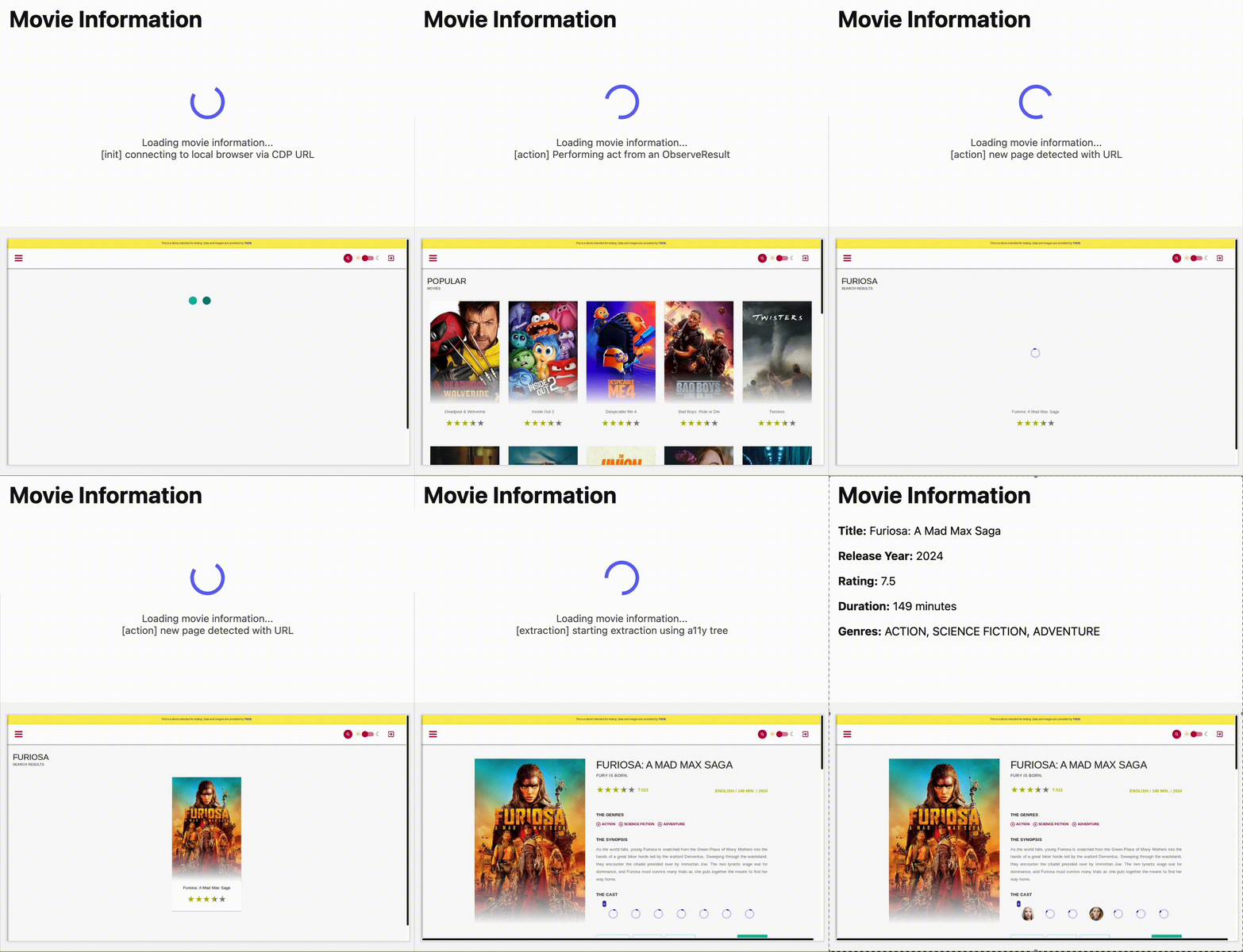
输出:

如果你想跳过步骤立即开始,请选择下方的 部署到 Cloudflare。
部署后,你可以使用以下 URL 模式与 Worker 交互:
https://<your-worker>.workers.dev安装必要的依赖:
npm ci更新 Wrangler 配置文件,包含 Browser Run 和 Workers AI 的绑定:
{
	"name": "stagehand-example",
	"main": "src/index.ts",
	"compatibility_flags": ["nodejs_compat"],
	// Set this to today's date
	"compatibility_date": "2026-08-17",
	"observability": {
		"enabled": true
	},
	"browser": {
		"binding": "BROWSER"
	},
	"ai": {
		"binding": "AI"
	}
}
name = "stagehand-example"
main = "src/index.ts"
compatibility_flags = [ "nodejs_compat" ]
# Set this to today's date
compatibility_date = "2026-08-17"
[observability]
enabled = true
[browser]
binding = "BROWSER"
[ai]
binding = "AI"如果你使用 Cloudflare Vite 插件,需要在 vite.config.ts 中包含以下 alias ↗:
export default defineConfig({
	// ...
	resolve: {
		alias: {
			playwright: "@cloudflare/playwright",
		},
	},
});
如果你未使用 Cloudflare Vite 插件,需要在 wrangler 配置中包含以下 module alias:
{
	// ...
	"alias": {
		"playwright": "@cloudflare/playwright",
	},
}将 workersAIClient.ts ↗ 复制到你的项目。
然后,在 Worker 代码中导入 workersAIClient.ts 文件,并使用它配置新的 Stagehand 实例:
import { Stagehand } from "@browserbasehq/stagehand";
import { z } from "zod";
import { endpointURLString } from "@cloudflare/playwright";
import { WorkersAIClient } from "./workersAIClient";

export default {
	async fetch(request: Request, env: Env) {
		if (new URL(request.url).pathname !== "/")
			return new Response("Not found", { status: 404 });

		const stagehand = new Stagehand({
			env: "LOCAL",
			localBrowserLaunchOptions: { cdpUrl: endpointURLString(env.BROWSER) },
			llmClient: new WorkersAIClient(env.AI),
			verbose: 1,
		});

		await stagehand.init();
		const page = stagehand.page;

		await page.goto("https://demo.playwright.dev/movies");

		// if search is a multi-step action, stagehand will return an array of actions it needs to act on
		const actions = await page.observe('Search for "Furiosa"');
		for (const action of actions) await page.act(action);

		await page.act("Click the search result");

		// normal playwright functions work as expected
		await page.waitForSelector(".info-wrapper .cast");

		let movieInfo = await page.extract({
			instruction: "Extract movie information",
			schema: z.object({
				title: z.string(),
				year: z.number(),
				rating: z.number(),
				genres: z.array(z.string()),
				duration: z.number().describe("Duration in minutes"),
			}),
		});

		await stagehand.close();

		return Response.json(movieInfo);
	},
};npm run build部署后,你可以使用以下 URL 模式与 Worker 交互:
https://<your-worker>.workers.devnpm run deployAI Gateway 是一项为你的 AI 应用添加可观测性的服务。通过 AI Gateway 路由请求,你可以监控和调试 AI 应用。
要在第三方模型中使用 AI Gateway,请先在 Cloudflare 仪表板的 AI Gateway 页面创建 gateway(网关)。
Go to AI Gateway ↗在本示例中,我们将 gateway 命名为 stagehand-example-gateway。
const stagehand = new Stagehand({
	env: "LOCAL",
	localBrowserLaunchOptions: { cdpUrl },
	llmClient: new WorkersAIClient(env.AI, {
		gateway: {
			id: "stagehand-example-gateway",
		},
	}),
});如果你想使用 Workers AI 之外的模型,可以配置 Stagehand 使用支持的第三方提供商 ↗(包括 OpenAI 和 Anthropic)的模型,并提供你自己的凭据。
在本示例中,你将配置 Stagehand 使用 OpenAI ↗。你需要 OpenAI API key。Cloudflare 建议将 API key 存储为密钥。
npx wrangler secret put OPENAI_API_KEY然后,使用你的提供商、模型和 API key 配置 Stagehand。
const stagehand = new Stagehand({
	env: "LOCAL",
	localBrowserLaunchOptions: { cdpUrl: endpointURLString(env.BROWSER) },
	modelName: "openai/gpt-4.1",
	modelClientOptions: {
		apiKey: env.OPENAI_API_KEY,
	},
});AI Gateway 是一项为你的 AI 应用添加可观测性的服务。通过 AI Gateway 路由请求,你可以监控和调试 AI 应用。
要在第三方模型中使用 AI Gateway,请先在 Cloudflare 仪表板的 AI Gateway 页面创建 gateway(网关)。
Go to AI Gateway ↗在本示例中,我们使用 OpenAI 与 AI Gateway。请确保按如下所示添加 baseURL,并使用你自己的 Account ID 和 Gateway ID。
你必须在 modelClientOptions 中指定 apiKey:
const stagehand = new Stagehand({
	env: "LOCAL",
	localBrowserLaunchOptions: { cdpUrl: endpointURLString(env.BROWSER) },
	modelName: "openai/gpt-4.1",
	modelClientOptions: {
		apiKey: env.OPENAI_API_KEY,
		baseURL: `https://gateway.ai.cloudflare.com/v1/{account_id}/{gateway_id}/openai`,
	},
});
如果你使用经过身份验证的 AI Gateway,请遵循 AI Gateway 身份验证 中的说明,并将 cf-aig-authorization 作为请求头包含。
有关 Stagehand 方法和功能的完整列表,请参阅官方 Stagehand API 文档 ↗。