
如果你正在构建 Workers 应用,并希望与其他开发者分享,可以将「部署到 Cloudflare」按钮嵌入 README、博客文章或文档中,让其他人在其自己的 Cloudflare 账户上快速部署你的应用。「部署到 Cloudflare」按钮无需复杂设置,开发者只需点击几下即可从你公开的 GitHub 或 GitLab 仓库开始使用。
「部署到 Cloudflare」按钮通过让 Cloudflare 完成以下操作,简化 Workers 应用的部署流程:
- 克隆 Git 仓库:Cloudflare 将你的源代码仓库克隆到用户的 GitHub/GitLab 账户中,部署后用户可在其中继续开发。
- 配置项目:用户可在单一设置页面上自定义仓库名称、Worker 名称和所需资源名称等关键信息,这些自定义项会反映到新创建的 Git 仓库中。
- 构建与部署:Cloudflare 使用 Workers Builds 构建应用并将其部署到 Cloudflare 网络。任何所需资源都会自动配置并绑定(binding)到 Worker,无需额外设置。
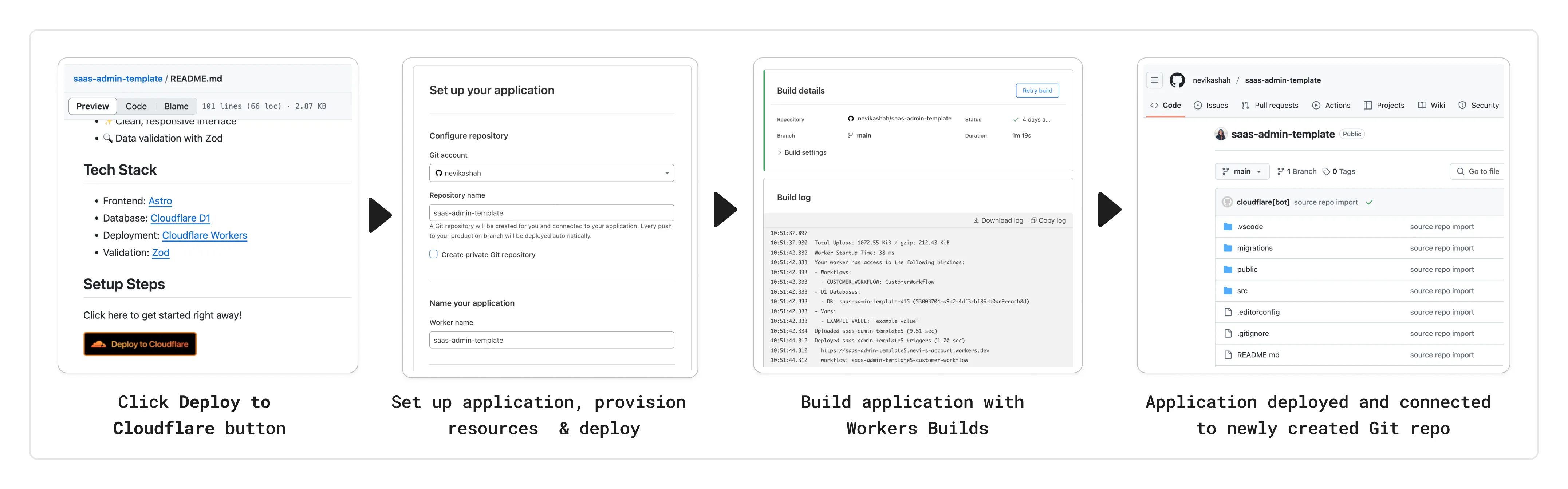
「部署到 Cloudflare」按钮可以嵌入到开发者可能启动你项目的任何位置。要添加「部署到 Cloudflare」按钮,请复制以下代码片段,并将 Git 仓库 URL 替换为你项目的 URL。你也可以选择指定子目录。
[](https://deploy.workers.cloudflare.com/?url=<your git repo URL>)<a href="https://deploy.workers.cloudflare.com/?url=<YOUR_REPO_URL>"><img src="https://deploy.workers.cloudflare.com/button" alt="Deploy to Cloudflare"/></a>https://deploy.workers.cloudflare.com/?url=<YOUR_REPO_URL>如果你已使用 Workers Builds 部署应用,可以直接从 Cloudflare 仪表板生成「部署到 Cloudflare」按钮:选择分享按钮(位于 Worker 详情页内)并复制提供的代码片段。
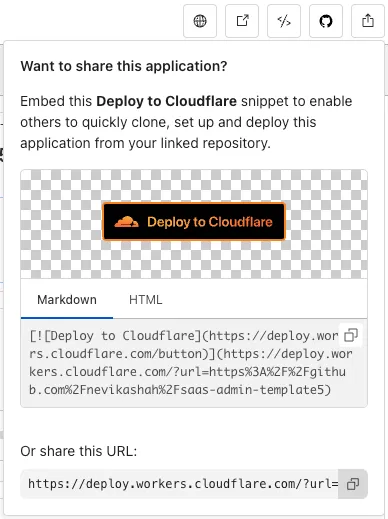
获取代码片段后,可将其粘贴到任何希望显示按钮的位置。
如果你的 Worker 应用需要 Cloudflare 资源,它们将作为部署的一部分自动配置。目前支持的资源包括:
- 存储:KV namespaces、D1 databases、R2 buckets、Hyperdrive、Vectorize databases 和 Secrets Store Secrets
- 计算:Durable Objects、Workers AI 和 Queues
Cloudflare 会读取源仓库中的 Wrangler 配置文件,以确定应用的资源需求。部署期间,Cloudflare 会配置所有必要资源,并在适用情况下更新 Wrangler 配置中新创建资源的相应项(例如 database ID 和 namespace ID)。为确保部署成功,请确保源仓库为每个绑定(binding)的资源名称、资源 ID 及其他属性包含默认值。
Worker 环境变量 可以像往常一样在 Wrangler 配置文件中定义:
{
  "name": "my-worker",
  "main": "./src/index.ts",
	// Set this to today's date
	"compatibility_date": "2026-08-17",
  "vars": {
    "API_HOST": "https://example.com",
  },
}
name = "my-worker"
main = "./src/index.ts"
# Set this to today's date
compatibility_date = "2026-08-17"
[vars]
API_HOST = "https://example.com"Worker secrets 可以在 .dev.vars.example 或 .env.example 文件中以 dotenv ↗ 格式定义:
COOKIE_SIGNING_KEY=my-secret # commentSecrets Store 密钥可以像往常一样在 Wrangler 配置文件中配置:
{
  "name": "my-worker",
  "main": "./src/index.ts",
	// Set this to today's date
	"compatibility_date": "2026-08-17",
	"secrets_store_secrets": [
		{
			"binding": "API_KEY",
			"store_id": "demo",
			"secret_name": "api-key"
		}
	]
}
name = "my-worker"
main = "./src/index.ts"
# Set this to today's date
compatibility_date = "2026-08-17"
[[secrets_store_secrets]]
binding = "API_KEY"
store_id = "demo"
secret_name = "api-key"配置 Build/Deploy 命令:如果你在 package.json 中使用自定义 build 和 deploy 脚本(例如,使用全栈框架或运行 D1 迁移),Cloudflare 会自动检测并预填充 build 和 deploy 字段。用户可以在部署配置期间选择修改或接受这些自定义命令。
如果未指定 deploy 脚本,Cloudflare 会默认预配置 npx wrangler deploy。如果未指定 build 脚本,Cloudflare 会将该字段留空。
运行 D1 迁移:如果希望在设置过程中运行迁移,可以在 package.json 中将迁移作为 deploy 脚本的一部分运行。迁移命令应引用绑定(binding)名称而非数据库名称,以确保当用户指定的数据库名称与源仓库不同时迁移仍能成功。以下是 package.json 中 scripts 部分的设置示例:
{
	"scripts": {
		"build": "astro build",
		"deploy": "npm run db:migrations:apply && wrangler deploy",
		"db:migrations:apply": "wrangler d1 migrations apply DB_BINDING --remote"
	}
}为绑定(binding)提供描述:如果你希望提供有关绑定的额外信息,例如它们在此模板中的用途,或如何配置值的建议,可以在 package.json 中提供 description。这对于环境变量和密钥尤其有用,因为用户可能需要在 Cloudflare 之外查找相应的值。
支持内联 markdown:`code`、**bold**、__italics__ 和 [links](https://example.com)。
{
	"name": "my-worker",
	"private": true,
	"cloudflare": {
		"bindings": {
			"API_KEY": {
				"description": "Select your company's [API key](https://example.com/) for connecting to the example service."
			},
			"COOKIE_SIGNING_KEY": {
				"description": "Generate a random string using `openssl rand -hex 32`."
			}
		}
	}
}- Monorepos:Cloudflare 不完全支持 monorepos
- 如果仓库 URL 包含子目录,你的应用必须完全隔离在该子目录内,包括所有依赖项。否则构建将失败。Cloudflare 会将该子目录视为部署过程中创建的新仓库的根目录。
- 此外,如果你的 monorepo 包含多个 Workers 应用,它们不会一起部署。你需要为每个应用配置单独的「部署到 Cloudflare」按钮。用户需要为每个子目录手动创建独立的 Workers 应用。
- Pages 应用:「部署到 Cloudflare」按钮仅支持 Workers 应用。
- 非 GitHub/GitLab 仓库:不支持 github.com 和 gitlab.com 以外的源代码仓库。也不支持自托管的 GitHub 和 GitLab。
- 私有仓库:仓库必须为公开状态,其他用户才能成功使用你的「部署到 Cloudflare」按钮。